
Top 10 eBook Readers (reading apps)
Updated: March 12, 2026 | Editor: Maria Lin
Ebook reading apps allow to comfortably read books on various devices: PC, Mac, Linux, iOS, Android and Online in the browser. Most ebook readers support popular formats: EPUB, MOBI, FB2, PDF. There are also reading apps, that support more rare formats like CHM, DJVU, Comic and TXT.
1


Free e-book reader that supports multiple file formats, including ePub, fb2, mobi, HTML, RTF, HTML, plain text, doc, and more. FBReader uses its own page parsing and rendering engine - very lightweight, fast and customizable. It supports embedded images, footnotes, hyperlinks, text search, full-screen reading. It also automatically creates bookmarks so you don't lose track of where you left off after closing a book. It works on iOS, Android, Windows, Mac OS, Linux, and Chrome OS. Books can be synced across devices or stored in Google Drive. For Android and iOS there are both free and paid versions. Free versions have some limitations.
2

AlfaReader is a lightweight and fast ebook reader, ideal for reading electronic magazines, student textbooks, medical, scientific, technical books, illustrated books for kids. Allows to make bookmarks, save knowledge blocks, add comments, download books for OPDS. Includes built-in audiobook player. Integrates with popular ebook organizer Alfa Ebooks Manager.
3


Cute and simple mobile app for reading books on iOS and Android. Provides bookmarks, 3-colors highlights, interactive links and notes, dark mode, customized settings (Fonts, Fields, Text size, screen Brightness, Page scrolling, ets). Suppots text formats: EPUB, MOBI, DOC, DOCX, TXT, FB2, PRC, RTF, ODT, HTML, AZW, AZW3. Completely AD-FREE. Syncs ebooks and reading progress between devices. Free web e-reader is also available. You can upload books via iTunes, import your files from the email, web browser, cloud storages (iCloud, Google Drive, Dropbox, Yandex.Disk etc).
4
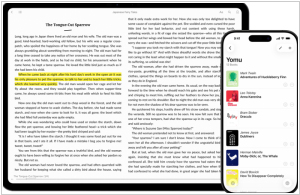
Free eBook reader app for iOS and Mac. Yomu's design is carefully optimized in Apple style: flexible layout dynamically adjusts all text properties and margins based on your preferences and device. You can choose your favorite theme, reading mode (day, sepia, gray, twilight, night, black), select a preset or custom font size, content layout (page, scrolling), and many other options. All settings can be saved separately for each book. You can view the TOC, copy text, take notes, and search within books. EPub, Mobi, PDF, and Kindle formats are supported. You can download books directly from the browser, add them via AirDrop, iCloud Drive, iTunes File Sharing, or from Dropbox, Google Drive, OneDrive, OPDS, and Calibre.
5

Popular Android app that lets read books offline or directly from online book sites and OPDS. It features a comfortable viewing mode with smooth scrolling, full set of visual settings: line spacing, font size, bold, italic, shadow, alpha channel, smooth edge transitions. Over 10 built-in themes, including a day/night mode switch. Various page navigation options: touchscreen, volume keys, even the camera, search, or back buttons. The free version is ad-supported, while the paid version offers TTS engine, PDF support, more beautiful backgrounds, fonts and reading themes, password protection on startup, annotation sharing, reading statistics.
6

Cross-platform EPUB reader that supports ePub2 and most ePub3 standards and works everywhere: on iPhone, iPad, Mac, Android, Windows, Kindle Fire and even via the web version. There's a free version that provides basic functionality, including a simple book organizer. The paid version allows you to store books in a cloud account (10 GB), sync books and reading progress between devices, add annotations and comments, choose different themes, and customize the reader's appearance more flexibly.
7

Desktop reader that supports EPUB, MOBI, FB2 and CBR formats (DRM-protected content is not supported) and provides basic functionality for managing your digital library. Allows to read in full-screen mode, night mode, track your reading progress, use bookmarks, search inside text, adjust the font family, font size and line spacing, set the text layout to two or one page. You can add notes, search and sort notes by text or color. Copying text from books and adding notes are only available in the paid version, which also offers text-to-speech (different voices available depending on your system settings) and text translation.
8

Mobile app (Android, iOS) with an integrated bookstore (Feedbooks), which also allows you to borrow books from your local library and import your own EPUB, CBZ, or PDF files. Contains audio player. Thus, it lets you gather all your ebooks, comics and audiobooks in one place, regardless of their origin. The store contains 1.2M titles -from bestsellers to literary classics from major global and independent publishers. Books are available in English, French, German, Spanish and Italian. Aldiko can access compatible library catalogs (thanks to OPDS support), so you can browse and interact with your library's catalog.
9

Free Adobe's reader for PDF and EPUB eBooks on PC, Mac and mobile devices. It lets you purchase and download digital content, borrow books from local libraries and read them both online and offline. It also lets you add bookmarks, highlight and mark important and favorite passages in your eBook. ADE is ideal for reading scientific and professional illustrated books. It supports right-to-left reading, dynamic image resizing without loss of clarity, improved display of mathematical formulas, smart searching, and text navigation. It syncs library across devices and includes a built-in player for playing audiobooks. ADE can be used with various screen readers, including JAWS, Window-eyes, and NVDA on Windows, and Voiceover on Mac OS.
10

EBookDroid is a highly customizable document viewer for Android. EBookDroid supports the following ebook and document formats: DjVU, PDF, XPS (OpenXPS), FictionBook (fb2 and fb2.zip), Comics Book formats (cbr and cbz), plus - starting with version 2.0 - EPUB and RTF. EBookDroid 2.0 provides the following extra tools: text selection, highlighting, text notes and page notebooks, free-hand annotations, external dictionary support.
11

Free Android reader that supports formats fb2, fbz, txt, epub, html, doc, odt, rtf, mobi, prc, archives. Its local library allows to sort books by author, series, title, year of publication, genre. The app provides such functions as converting text to speech, downloading from OPDS, setting file encoding, dictionaries, editing Fb2 and TXT files, profiles with independent settings of font, color, brightness, gamma correction and text indentation. You can choose one- and two-page reading mode with automatic switching to two-page mode in landscape orientation. Appearance adaptation for E-Ink screens, support for "fast" update for Sony T1/T2, Nook Simple Touch/Nook Simple Touch with Glow Light, Onyx Maxwel/Kopernik/Kepler, Texet 138.
12

Free open-source, XML/CSS-based e-book reader for Windows and Linux. There's also mobile version for Android and some eInk devices. Supported formats include FB2, TXT, RTF, DOC, TCR, HTML, EPUB, CHM, PDB, and MOBI. The program offers numerous settings for improved reading experience. It's arguably the best reader for Linux, but on Windows, it has some issues, such as linking e-book extensions to the program so it opens when clicking on a book file.
13

SumatraPDF, also known as Sumatra, is a free and open-source software PDF reader for Microsoft Windows only. The program also opens Open XML Paper Specification, DjVu, EPUB, XPS, CHM, CBZ and CBR, and MOBI files
14

Free online service in which you can upload, preview and read your ebooks in EPUB, MOBI, AZW3, PDF, and CBR formats. Doesn't require downloading any software. Even large ebooks are rendered instantly. It provides easy book navigation thanks to a built-in thumbs pane and table of contents and full-text keyword search. It offers numerous customization options to enhance your reading experience. You can customize the font size, typeface, color scheme to make reading as comfortable as possible. You can also adjust the brightness to suit your surroundings and reduce eye strain.
15

KOReader is a document viewer for E Ink devices. Supported file formats include EPUB, PDF, DjVu, XPS, CBT, CBZ, FB2, PDB, TXT, HTML, RTF, CHM, DOC, MOBI and ZIP files. It’s available for Kindle, Kobo, PocketBook, Android and desktop Linux.
16

Cloud-based eBook manager that allows users to create a personalized online library, accessible from any device. It offers a simple interface, organization features for sorting and tagging books and AI integration for additional information. Provides free open-source version
17

Lucidor is a simple tool for reading, managing and organizing your eBooks within your own personal bookcase. It supports ePub and OPDS catalog files. You can search for eBooks online and download them right into the application. A unique feature Lucidor has is the ability to have multiple eBooks open at one time. It does this via it’s tabbed interface, which is much like a Web browser. Lucidor even supports themes. There is also a search bar for finding specific keywords or phrases within your content.
18

Multi-functional Android app for reading books. It features automatic folder scanning and adding books to the library, bookmarks, annotations, TOC, online catalog and dictionary support, syncing between Android devices via Google Drive (reading progress, bookmarks, etc.), day and night modes, custom CSS support, "Musician mode" with adjustable scrolling speed, TTS reading, built-in media player and online format conversion. The volume control functionality, background and fonts can be customized. All collections can be viewed in a list or grid view. Books are easily identified by thumbnail covers with adjustable size and style, as well as detailed descriptions. The free version contains ads.
19

A simple, focused eBook reader for Linux. Read the books you love without having to worry about different format complexities like epub, pdf, mobi, cbr, etc.
20

iOS e-reader unlike any other. The app supports FB2, EPUB, MOBI, PDF, DJVU, CBR, CBZ, and TXT formats, and offers customizable fonts, paragraph indents, paper type, and much more. iBouquiniste features include note-taking, emailing books, bookshelves by author, recently opened book view. Books can be downloaded via iTunes or any app that supports file transfer (such as Mail or Safari). OPDS catalogs are supported. The app also provides its own cloud storage for syncing books, reading positions, quotes, and bookmarks.
21

Adobe Reader software is the free trusted standard for reliably viewing, printing, and annotating PDF documents. It’s the only PDF file viewer that can open and interact with all types of PDF content, including forms and multimedia.
22

GooReader is a desktop app that allows you to read and download Google Books, add bookmarks, annotations, create a local Library and save books to PDF. GooReader allows to access your online Google Library and manage your personal bookshelves.
23

A simple and modern eBook viewer for Linux desktops. Beautiful Pages. Supports EPUB, Mobipocket, Kindle, FictionBook, and comic book archive formats. Single-column, two-column, or continuous scrolling layouts
24

Lithium is an EPUB reader app for Android. It features automatic book detection, highlighting & notes, night & sepia themes, switch between pages and scrolling. Built with Material Design. 100% ad-free. The pro version allows to sync reading position, highlights, notes, bookmarks and more across your devices with Google Drive (books themselves are not currently synced), custom reading themes (custom colors).
25

eReader Prestigio: Book Reader is a multi lingual, multi format text and audio books reading app. Intuitive interface in over 25 languages and an in app store library with over 50,000 text (for children and adults) books and Text-To-Speech (read along) functionality.
26

ReadEra is an Android application for reading books and viewing documents, free and without ads. Open and read book files in EPUB, FB2, PDF, DJVU, MOBI, DOC, RTF, TXT and CHM formats. Automatically detects and displays the list of all supported documents on your device, Identifies duplicate files. Support for a table of contents, bookmarks, visual styles. Automatically saves the current reading position, even if the files are moved or temporarily deleted.
27

Cisdem Document Reader is a professional program to view a variety of file types on Mac, including DjVu. It accommodates a set of tools for excellent reading experience, also has additional features to convert, print, extract, zoom, bookmark, rotate, or search the files with ease.
28

WinDjView is a fast, compact and powerful DjVu viewer for Windows with tabbed interface, continuous scrolling and advanced printing options. It uses the free DjVuLibre library to decode DjVu documents. DjVu is a web-centric format and software platform for distributing documents and images.
29

DjView4 is a new portable DjVu viewer and browser plugin. Entirely based on the public djvulibre api. Entirely written in portable Qt4. Works with Qt/X11, Qt/Mac, and Qt/Windows. Continuous scrolling of pages. Side-by-side display of pages. Ability to specify a url to the djview command. All plugin and cgi options available from the command line.
30

Bluefire helps businesses and institutions of all kinds launch innovative new products, and platforms for the distribution and use of digital content. Bluefire has the industry knowledge, relationships, apps, SDKs, and the expertise to make your ebook system thrive
31

A light weight yet powerful CHM file reader. Auto scan CHM file in SDCard, or you can select the book folder. TOC tree support. Full screen support. Auto set zoom level and page scoll of your last reading. Large file support. Bookmarks. Language encoding. Brightness adjustment. Night mode.
32

VuDroid is a djvu and pdf document viewer based on code base of DjvuDroid and PdfDroid viewers. New VuDroid viewer will offer redesigned DjvuDroid features: zoom by slider drag, progressive tree rendering, fast orientation change, page num visualization while scroll and more
33

Xodo is a set of online tools that allow to securely view, read, annotate, convert and work with your PDF books. Conversion directions are Word, HTML, TXT, PowerPoint and others. Xodo also provides free PDF reader for Windows, Mac and Linux that allows to open, read, print PDFs offline on your desktop, while Xodo Mobile all-in-one app - enable to do all this on iOS and Android.
34

DjVu Reader is an application that allows you to browse through DjVu of documents of any size (in page count; some documents are so large in image size that they are not suitable to be viewed on the iPad, like charts etc). It features an active zooming capability, pan displacements, vertical scrolling, fullscreen reading.
35

iPhone app for reading books in CHM format. It lets you organize your books into personal collections, add bookmarks or notes to your favorite passages, find the text you need anywhere in the book. The app features customizable fonts for headings, body text, and code snippets, adjustable line height, fast scrolling, and seamless page navigation. You can share quotes with friends on Facebook, X, or by email, find a words, characters or phrases anywhere in the book using the built-in search function, add files from your computer browser or iTunes file sharing. The paid version allows to read multiple books simultaneously.
36

Freda is a free program for reading electronic books (ebooks) on Windows and Android. On Windows, it's a Universal App, which means it runs equally well on your desktop PC or tablet PC, and on your Windows Mobile phone. On Android, it works on any phone or tablet running Jellybean, Kitkat or any more recent version of the operating system.
37

MagicScroll Web Reader is a Chrome plug-in that turns every page on the web into a MagicScroll book. Its unique scrolling system lets you scroll web pages without moving them, making it easier to read long articles without being distracted. It's simple and easy and free to use. After install you'll see a small book icon in the chrome toolbar. Visit a page you want to read and click the icon to transform it into a MagicScroll book.
38

Finally a comic reader for iPad done right! ComicFlow was designed with one goal in mind: providing the best experience for comic fans with large collections. Features: Polished interface, Can handle very large comic collections (1,500+ comics and dozens of GB) without crashing or becoming unusable, Imports new comics in the background, Doesn't need to pre-process comic files before you can read them, Supports .cbr, .cbz and pdf files
39

DjVu Reader is an application that allows you to browse through DjVu of documents of any size (in page count; some documents are so large in image size that they are not suitable to be viewed on the iPad, like charts etc). It features an active zooming capability, pan displacements, vertical scrolling, fullscreen reading.
40

Whether you’re an author looking to launch your next book or an educational institution looking to improve student success, Pressbooks can help you easily create, adapt, and share accessible high-quality digital books, learning materials, curriculum and more.
41

EPUBReader is a browser addon which lets you read ePub-files without DRM just in the browser. You don't need to install additional software. If you click on a link to an ePub-file, you are normally prompted by the Firefox or Chrome "save as" dialog. With EPUBReader installed, the ePub-file is downloaded, processed and directly displayed ready to read. It runs on every operating system (Windows, MacOS X, Linux)
42

Microsoft Reader is designed to make your onscreen reading experience as close as possible to reading a printed book. In addition, it adds active reading capabilities, instant access to content, and a personal library. Features include high-resolution ClearType and an add-on dictionary, as well as the ability to bookmark, highlight, annotate, make notes and drawings, and much more. Version 2.1.1 includes a security update that closes known gaps in the Microsoft Reader security architecture.
43

ShortBook is an electronic book reader using unique capabilities of your iPhone. It has everything that is necessary for comfortable reading of books in fb2 format: contents, figures, footnotes and unique text makeup. Handy interface allows finding books quickly and reading them with comfort. Night reading mode will reduce discomfort for those who suffer from sleeplessness and Quick Bookmark function will ensure free browsing through a book. Book downloading is available via Wi-Fi being handily implemented through the web browser. For your further comfort there are options of choosing font, its size and other settings.
44

Readk.it is a responsive EPUB reading system taking advantage of the abilities of modern web browsers to allow an attractive reading experience on all manner of devices. Readk.it is free for all to use and adapt.
45

Manifold is a free open-source platform for publishing academic or school libraries on the web. You can add nearly anything: video, audio, images, downloads, data visualizations, PDFs, external links, and more. Authors and readers can annotate texts and comment on resources. Students and instructors can form reading groups to annotate collaboratively.

47

FB2Reader for Google Chrome allows you to read FB2 books right in the browser. The books that you add to the reader are stored in the internal browser repository, so the reader doesn't require internet.
48

DjVuLibre is an open source (GPL'ed) implementation of DjVu, including viewers, browser plugins, decoders, simple encoders, and utilities. DjVuLibre includes a standalone viewer, a browser plug-in (for Mozilla, Firefox, Konqueror, Netscape, Galeon, and Opera), and command line tools (decoders, encoders, utilities). DjVuLibre works under Unix with X11.
49

Hyphen is a beautiful, personal ePub reader for iPad and iPhone. It uses iCloud to sync your books, reading location, highlights and more. The app allows to highlight and comment on important parts of the text.
50

CloudReaders (TM) is a free book/comic/movie viewer, fully optimized for iPad (and now supports iPhone/iPod touch too!). It supports PDF, CBZ, ZIP, CBR, RAR, MOV, MP3, M4V, MP4 and 3GP format. It allows you to read any book/comic files in either PDF, ZIP/CBZ or RAR/CBR format transferred from your PC/Mac or downloaded from the Internet. CloudReaders also comes with a "cloud bookshelf", where you can download public domain books and comics for free (the number of books is small at this moment, but we are going to add a lot of books soon).

Latest news about eBook Readers (reading apps)
13.06.26. Apple Books gets better audiobooks with new Siri Intelligence
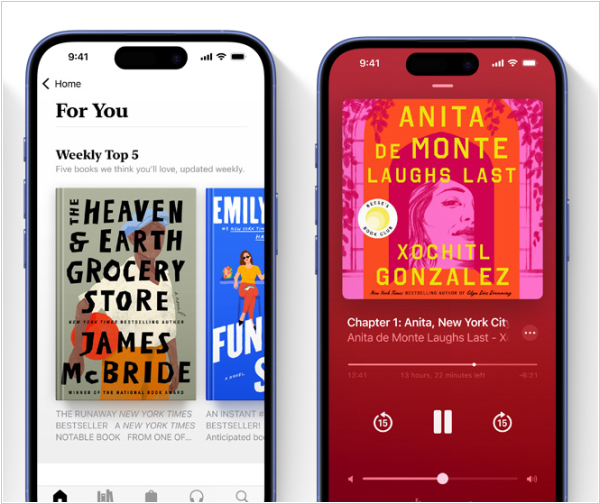
Apple has unveiled the new version of iOS (27), featuring an updated Siri AI and the Apple Books app has also got some benefits from this update. It now offers enhanced AI-powered audiobook narration, smarter reading goals with daily recommendations and overall deeper integration with Siri (for example, you can ask Siri to launch a book you're currently listening to). Searching and interacting with content in Apple Books has become smarter, using your history as context. System-wide performance improvements in iOS 27 also speed up the Books app: it launches faster, opens large files and syncs with the cloud.
2026. Amazon replaces Kindle for Windows
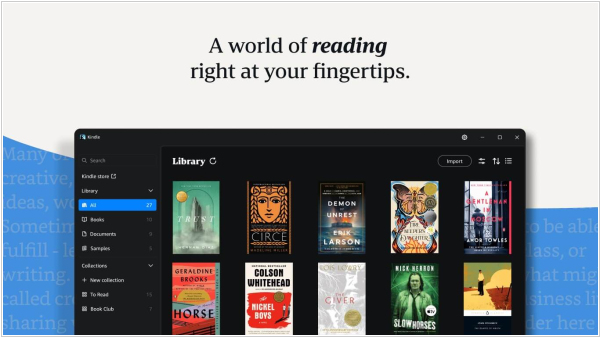
Last month, Amazon announced it would be ending support for the Kindle desktop app on June 30, 2026. After that date, the app will no longer function and users will be unable to read their ebooks or other digital content. However, it turns out the company has decided to simply replace Kindle for Windows, likely to eliminate the ability to export books from it. The new Kindle app for Windows 11 is now available for download from the Microsoft Store. It allows you to read not only ebooks but also comics and manga (it is fully compatible with Comixology's Guided View system). Users can also upload their own books to the app and read them. All your progress will be saved in Kindle app for Android, iOS and Kindle e-readers. It is also compatible with audiobooks purchased from Audible or Amazon.




