
Top 10 Ebook Creation software
Updated: May 06, 2026 | Editor: Laura Candler
Ebook editors and ebook writing apps allow authors to create and format ebooks for publishing on the Web or via self-publishing platforms like Kindle or Kobo. Ebook creation software generates electronic books in PDF, EPUB, MOBI and FB2.
1

Win/Mac software for writers of all genres and screenwriters. Everything you write is integrated into a convenient project plan that's easy to edit. The program makes working on long texts easier because it breaks them down into smaller sections. Writers can write each scene in a separate document or entire chapters as a single unit; theses can be divided into arguments, chapters or paragraphs. The Corkboard interface allows you to overview character stories, chapters or the entire book. It also allows to organize reference materials into collections, flexibly customize formatting and styles, create templates for frequently repeated sections, edit metadata, export the book to popular formats such as Word, PDF and Final Draft, create automatic backups. Authors also can use iOS app that allows to write while traveling and then sync with desktop via Dropbox or iTunes.
2

Book writing software for fiction authors. Includes text editor and a suite of planning and plotting features. The desktop app for Mac/Windows syncs with LivingWriter on the web, iOS, and Android. It offers drag-and-drop chapters and subchapters, templates, virtual corkboards, dark mode, chapter notes. It features user-friendly interface that requires no training. Predictive text tool recognizes elements of your story as you type. The program backs up your work after every keystroke, storing them securely in the cloud. The graph tool lets you visualize your story in any way you like. Co-authoring and real-time editing are also available.
3

Free text formatting for books you want to publish on Amazon. Allows to create 4 types of ebooks: Reflowable (typical for novels, essays and memoirs - allows to resize the text and adapt it to the screen size), Interactive Print Copy (for textbooks, guidebooks and cookbooks - retain the look and feel of the print editions), Comics (includes a Guided View feature that animates the transition between panels with each swipe, showing how the story unfolds on each page) and Children's ebooks (also with Guided View, which uses interactivity to mimic the way people read stories, one section at a time, reducing distractions). Doesn't allow cover creation.
4


Calibre is a free, open-source program (written in Python) for managing e-book libraries on Windows, Mac and Linux. It offers the most rich set of features, divided into the following main categories: library management, e-book conversion, synchronization with e-readers, downloading news from the internet and converting them to e-book formats, e-book viewer-reader, e-book editor and a content server for web access to your book collection. The program reorganizes book files into own structure. There are numerous plugins developed for the program by the community. However, many find the interface cluttered and unwieldy.
5

Atticus is a program for book authors that allows to create professional print and e-books on all platforms: Windows, Mac, Linux and Chrome. The program lets you import books from Word and other formats, customize the appearance of a book (choose one of 17 ready-made templates or create own theme in the builder), preview how your book will look on different devices (Kindle, Kobo, smartphones, etc.), format the text and export the book for any ecosystem and book sales platform. Atticus allows to work online and offline – it automatically saves your texts as you write and creates backups in the cloud.
6

Online service for converting PDF files into digital interactive books that can be embedded on your website. The advantage of interactive book is that it can be supplemented with media content and other elements, such as links and videos. Distribution is easier and more cost-effective, as links to your interactive books can be added to emails, shared on social media, or converted into QR codes for in-person scanning. Interactive books have flippable pages, just like printed books, but they provide statistics on who is reading your publications. Meaningful audience engagement data will help you analyze, adapt and promote your work. Issuu also allows to monetize your books through digital sales.
7

Reedsy is free and simple cloud based ebook creation platform. You can either write your whole book there, or copy and paste it in once you are finished. You can add pictures and notes. On the downside, the customizing options are very limited: this is the price you have to pay for them to be able to automatically generate your beautiful book.
8

Jutoh Ebook Editor For Windows, Mac and Linux. Easily create ebooks in Epub and Kindle formats: publish on any ebook distribution site, including Amazon's Kindle, Apple's iBooks, Google Play, Kobo, and more. Your readers can use Kindles, iPads, iPhones, Android tablets and phones, Macs and PCs. You can also create PDFs suitable for sending to print-on-demand services.
9

Sigil is a free multi-platform EPUB ebook editor (think Word or LibreOffice but specific for EPUB ebooks) with the following features: WYSIWYG editing, Table of Contents generator with multi-level heading support, EPUB 2 spec support with limited EPUB 3 support, multiple views: Book View, Code View and Preview View, Metadata editor, spell checking with default and user configurable dictionaries, import of EPUB and HTML files, images, and style sheets.
10

The only writing platform with unlimited potential through project management, collaboration, and publishing.
11

Book writing software. Write anywhere, anytime, online and offline. Always autosaved. Easily organized. Focus mode and goal tracking
12

Vellum is a software for creating Apple-, Kobo- and Amazon-approved ebooks and POD books with one click. It creates not only professional but beautiful text-centric ebooks. The creators took care of everything: simple to use, easily imports from Word, and easy to change things even after the epub export. Only Available for Mac
13

Fress open-source tool for writers. Organize your thoughts and snippets in a hierarchical manner. Organize them as you wish, reorganize them on the go. Get rid of all distraction while writing. Set personal goal in word count or time before you can leave editor. Use the snowflake method to grow your single genius idea in an coherent whole, with complex characters, intricate plots and detailed universe.
14

The Ultimate Writing App for Mac, iPad and iPhone. Powerful features and a pleasant, focused writing experience combined in one tool, made for people who love to write and write a lot
15

bibisco is the perfect companion for your novel writing journey. bibisco provides all the features and tools you need to draft, refine, and share your story with ease. With its distraction-free editor, comprehensive novel analysis, and world-building features, you can create a captivating story from start to finish.
16

Everything you'll ever need to write and publish your story. Chapterly is purpose-built by best-selling authors to be the best authoring app to get published.
17

A powerful writing environment for novelists and screenwriters. Storyist provides a rich text editor with support for comments, images, headers, footers, and style sheets so you can create properly formatted manuscripts. Works on Mac and iPad
18

The industry-leading page design and layout app lets you create, preflight, and publish beautiful media-rich books. InDesign CC has everything you need to make eBooks, that draw people in with audio, video, slideshows, and animations. InDesign makes it easy to manage your design elements and quickly deliver immersive experiences in any format, from EPUB and PDF to HTML.
19

Creative expression requires the right tools and when it comes to professional results, details matter. QuarkXPress delivers stunning graphics, virtuoso productivity features and a design canvas to accentuate your creativity. So whether you love print or live digital, XPress Yourself with QuarkXPress.
20

Final Draft is the choice screenwriting software of studios and production companies worldwide. Streamlined screenwriting and editing while collaborating.
21

Free novel-writing software designed by veteran author and programmer, Simon Haynes. yWriter helps you to write a book by organising chapters, scenes, characters and locations in an easy-to-use interface.
22

Convert PDF, MS Office, Open Office & image into interactive online page turning book with links, video, audio and slideshow embedded. Add audio, YouTube video, local video, images, Flash effect and links to enhance the HTML5 flip book. Created HTML5 flip book can work on most browsers in PC, and fluently view on mobile device like smart phone and tablet.
23

FocusWriter is a simple, distraction-free writing environment. It utilizes a hide-away interface that you access by moving your mouse to the edges of the screen, allowing the program to have a familiar look and feel to it while still getting out of the way so that you can immerse yourself in your work. It’s available for Linux and Windows, and has been translated into many different languages.
24

Writemonkey is a Windows zenware writing application with an extremely stripped down user interface, leaving you alone with your thoughts and your words. It is light, fast and free. With an array of innovative tools under the hood and full Markdown* support, it helps you write better.
Latest news about Ebook Creation software
06.05.26. Vellum now allows to visualize word count
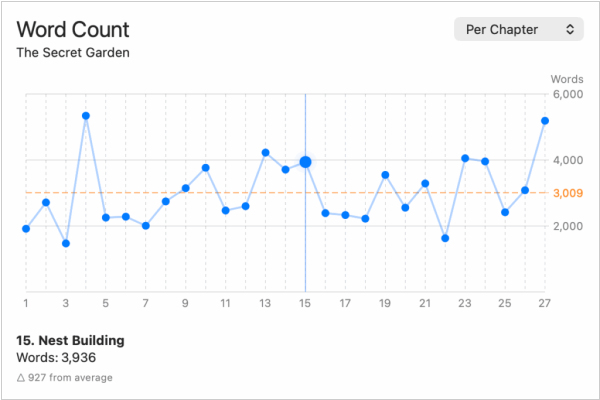
Ebook Creation software Vellum has released an update with some new features that give authors deeper insight into something every writer tracks: word count. Vellum has long displayed book’s word count, but now author can explore it visually with the new Word Count Graph. It displays the word count for each chapter and how it compares to the average, making it easy to analyze pacing, outliers and your book’s overall rhythm. The graph also offers a Running Total view, showing cumulative word count across the book. This view includes a marker indicating where your word count reaches 50%, so you can easily spot the midpoint.
2026. App for writers Ulysses gets new design and navigation
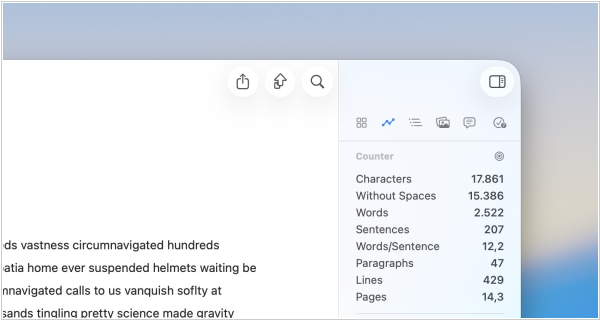
Writing app for Mac Ulysses implemented fresh new look that fully embraces the stunning qualities of Liquid Glass. Physical keyboard navigation now allows to use the arrow keys to move from Library to Editor and back again, use Return to drill down and CMD-Return to… drill up. Writers can now copy text for use on Substack. Most formatting is supported, platform limitations apply (no images), share whole projects as a zipped archive (to create manual backups or simple project templates), perform actions from anywhere in the system: create new sheets, add images, move groups…




