
Top 10 Article Management software
Updated: February 24, 2026 | Editor: Laura Candler
Reference management software that allows to keep a list of scientific papers and insert citations in your works.
1

Free, universal reference manager for managing and sharing research papers, as well as creating bibliographies for research articles. Mendeley allows to search over 100 million articles from multiple publishers, quickly add PDFs to your library, organize them with collections and tags, then read and annotate them. You can work with a single database across the desktop app, web version and Word plugin. It provides 2 GB of free storage. The program features an AI assistant that thoroughly understands your library and quickly finds what you need, identifying patterns, relationships, and missing links in your references. Mendeley's AI interprets the logic behind your queries, extracting context-rich information from your documents.
2

Free, open-source software for managing bibliographic data and research-related materials. Zotero helps to collect, organize, annotate, cite and share research results. The built-in assistant automatically identifies research as you browse the web and creates citations and bibliographies for any text editor, as well as directly in Word, LibreOffice, and Google Docs. You can sort items into collections and tag them with keywords. You can also create saved searches that automatically populate with relevant materials as you work. The program runs on Mac, Windows, Linux, Android, and iOS.
3

Intelligent reference manager that lets you store and manage an unlimited set of references, perform full-text searches, insert properly formatted references and create bibliographies as you write your research. The program uses a system of tags and rules to automatically organize references throughout a project, and AI to identify key findings. You can ask the AI additional questions and receive answers from the text to delve deeper into the topic. It also can translate whole PDFs. EndNote also includes collaborative tools that allow to share entire libraries or subsets of references, set access rights, view activity logs to stay informed about progress.
4

JabRef is an open-sourced, cross-platform citation and reference management software. It uses BibTeX and BibLaTeX as its native formats and is therefore typically used for LaTeX. It can retrieve and link full-text articles, fetch complete bibliographic information based on ISBN, DOI, PubMed-ID and arXiv-ID, import new references directly from the web browser extension. You can complete and improve bibliographic data by comparing with curated online catalogues such as Google Scholar, Springer or MathSciNet, automatically rename and move associated files according to customizable rules, group links into hierarchical collections, organize articles based on keywords, tags, search terms or your manual assignments. Advanced search and filter features are also available.
5

Enterprise-grade bibliographic reference management program that allows to store information on own server, rather than in the cloud. Every idea, citation and source can be organized in Citavi, allowing you to seamlessly move from information to conclusions. The program can automatically create outlines in Word documents, including citations and summaries. Citavi offers over 11,000 citation styles: APA, Chicago, MLA, Turabian, and more. You can easily export and share references and source documents, communicate with colleagues in real time, track tasks and collaborate in the cloud or locally on your server.
6

Cloud-based commercial software package for managing bibliographic references at educational or research institution. The program allows users to create references to electronic editions of journals subscribed to by the institution's library. It includes tools for administrative management, security, policy settings, institutional citation styles, analytics and reporting. RefWorks allows to collect, import and save references from virtually any source, including PubMed and the Library of Congress. It supports PDF, PowerPoint, Word, Excel and HTML formats.
7

Simple and convenient web app for managing bibliographic references, integrated with Google Apps (allows you to log in with your Google account, sync PDFs with Google Drive, cite articles in Google Docs, collect references using a Chrome extension). Paperpile lets you organize your articles with folders, tags, and stars, search the library in real time or quickly find articles online. It automatically corrects incomplete references and removes duplicates. You can import data directly from Google Scholar, PubMed, ArXiv and thousands of supported publisher websites. Apps for iOS and Android are available, as well as a Word plugin.
8

Reference manager that helps to collect and organize research materials. Imports information from your computer, databases, journals, other reference managers, Dimensions database (which provides AI-powered recommendations), automatically identifies and matches imported articles with full metadata and available supplementary data, citations and full texts. You can use tags, custom fields, labels, lists, ratings, smart collections and watch folders to keep everything organized and accessible as your library grows. In the articles you can highlight, underline, strikethrough, create inline annotations, draw and add stickers.
9

BibDesk is an open-source reference management software package for macOS, used to manage bibliographies and references when writing essays and articles. It can also be used to organize and maintain a library of documents in PDF format and other formats.
10

Google Scholar provides a simple way to broadly search for scholarly literature. Search across a wide variety of disciplines and sources: articles, theses, papers. Allows to create personal online library
11

Lean Library Workspace that streamlines your research workflow from discovery to citation with powerful tools that help you work faster and smarter.
Latest news about Article Management software
19.05.26. Paperpile adds AI chat integration
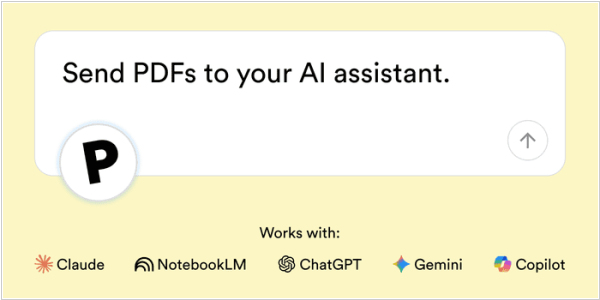
Paperpile, a web app for managing bibliographic references, now lets you send PDF articles to ChatGPT, NotebookLM or any other supported AI assistant. The new feature called Ask AI helps you quickly find a key citation or data point that will lead to the next step in your research. You can add one or more (up to 10) PDFs from your library to Ask AI, select a prompt and initiate a conversation with your preferred AI assistant (ChatGPT, Gemini, Claude or Copilot). Paperpile will send your full-text PDF and the selected prompt to the AI assistant. You can then ask follow-up questions, add additional articles or view citations in the full-text source PDF.
2026. Zotero gets Read Aloud function
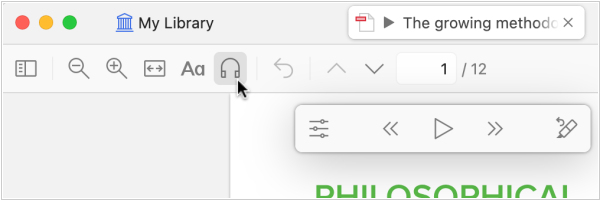
Zotero 9, the new version of the bibliography management software, has been released, introducing Read Aloud, which reads your documents in high-quality, natural-sounding voices. It works with PDFs, EPUBs and even webpage snapshots. While listening, you can move forward or backward through paragraphs or sentences (Option/Alt-click or Option/Alt-left/right) and you can start reading from a specific location by clicking in the left margin or right-clicking and selecting Read Aloud. The Annotate Sentence button will automatically highlight or underline the last sentence you heard and keyboard shortcuts let you quickly move, expand or delete a new annotation. Your last reading position is saved and synced across devices, so you can pick up where you left off on any device.




