Top 10 PDF Book Readers for iPhone and iPad
Updated: March 23, 2026 | Editor: Maria Lin
PDF Book Readers for iPhone and iPad allow to open and read PDF books on Apple iOS tablets and phones
1


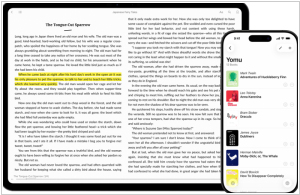
Free eBook reader app for iOS and Mac. Yomu's design is carefully optimized in Apple style: flexible layout dynamically adjusts all text properties and margins based on your preferences and device. You can choose your favorite theme, reading mode (day, sepia, gray, twilight, night, black), select a preset or custom font size, content layout (page, scrolling), and many other options. All settings can be saved separately for each book. You can view the TOC, copy text, take notes, and search within books. EPub, Mobi, PDF, and Kindle formats are supported. You can download books directly from the browser, add them via AirDrop, iCloud Drive, iTunes File Sharing, or from Dropbox, Google Drive, OneDrive, OPDS, and Calibre.
2


Mobile app (Android, iOS) with an integrated bookstore (Feedbooks), which also allows you to borrow books from your local library and import your own EPUB, CBZ, or PDF files. Contains audio player. Thus, it lets you gather all your ebooks, comics and audiobooks in one place, regardless of their origin. The store contains 1.2M titles -from bestsellers to literary classics from major global and independent publishers. Books are available in English, French, German, Spanish and Italian. Aldiko can access compatible library catalogs (thanks to OPDS support), so you can browse and interact with your library's catalog.
3


Free Adobe's reader for PDF and EPUB eBooks on PC, Mac and mobile devices. It lets you purchase and download digital content, borrow books from local libraries and read them both online and offline. It also lets you add bookmarks, highlight and mark important and favorite passages in your eBook. ADE is ideal for reading scientific and professional illustrated books. It supports right-to-left reading, dynamic image resizing without loss of clarity, improved display of mathematical formulas, smart searching, and text navigation. It syncs library across devices and includes a built-in player for playing audiobooks. ADE can be used with various screen readers, including JAWS, Window-eyes, and NVDA on Windows, and Voiceover on Mac OS.
4

i2Reader is an innovative and award-winning eBook reader. Support of EPUB, PDF, RTF, HTML, FB2, DOC and plain text formats. One-way built-in Web server to upload books and dictionaries from your computer. Custom-made PDF rendering engine that reformats the text from PDFs for easier reading on the iPhone screen.
5

ezPDF Reader is the only PDF viewer with the embedded multimedia file playing capability. It also supports the Annotations and PDF Form Filling. Clearly presented without the fluff, documents appear as they would on your PC, but customized to fit your mobile device's screen. Scanned and text based PDFs are all supported, including JPEG2000 and JBIG2 compression. Select Text Reflow, Fit to Text Column, Copy and paste text in PDF view and bookmark as you go.
6


Adobe Reader software is the free trusted standard for reliably viewing, printing, and annotating PDF documents. It’s the only PDF file viewer that can open and interact with all types of PDF content, including forms and multimedia.
7

Not only an eBooks, Comics reader but also a tons-of-free-ebook-downloader, with dictionary inside for you to studies languages.
8
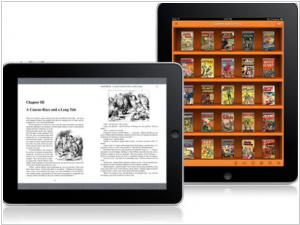
Bookman is the super fast PDF/Comic reader that is optimized for reading scanned PDF and Comic book archive files. You can download eBooks from websites with a built-in web browser. Contains online bookshelves for downloading, uploading, and moving and renaming files on DropBox. Supports PDF, ZIP,RAR, CBR, and CBZ.
9

GoodReader is the super-robust PDF reader for iPad, iPhone and iPod touch. With GoodReader on your iPad/iPhone, you can read virtually anything, anywhere: books, movies, maps, pictures. Use it once and you’ll be hooked. If you work with documents, soon you'll be wondering how you ever managed to use your iPad or iPhone without GoodReader. Besides reading, you can also sync your files with remote servers sync with Dropbox, SkyDrive, SugarSync and any WebDAV, AFP, SMB, FTP or SFTP server
10

ComicBookLover for Mac OS X enables comic fans to view, collect, and organize CBZ, CBR and PDF format digital comics. Other features include: browsing by cover artwork, smart lists, image adjustment for color and sharpness, and various viewing modes like single page, double page and Western or Manga mode.
11

Finally a comic reader for iPad done right! ComicFlow was designed with one goal in mind: providing the best experience for comic fans with large collections. Features: Polished interface, Can handle very large comic collections (1,500+ comics and dozens of GB) without crashing or becoming unusable, Imports new comics in the background, Doesn't need to pre-process comic files before you can read them, Supports .cbr, .cbz and pdf files
12

CloudReaders (TM) is a free book/comic/movie viewer, fully optimized for iPad (and now supports iPhone/iPod touch too!). It supports PDF, CBZ, ZIP, CBR, RAR, MOV, MP3, M4V, MP4 and 3GP format. It allows you to read any book/comic files in either PDF, ZIP/CBZ or RAR/CBR format transferred from your PC/Mac or downloaded from the Internet. CloudReaders also comes with a "cloud bookshelf", where you can download public domain books and comics for free (the number of books is small at this moment, but we are going to add a lot of books soon).