
Kobo Touch vs ONYX BOOX Note
April 23, 2026 | Author: Dhaval Parekh
8

This was the first Kobo's model with touchscreen, that gave the name Touch. It's a simple 6-inch lightweight reader with 800 x 600 resolution, 16-level grey scale, 2Gb storage, SD card and travel friendly design. It still uses the newest Kobo firmware (if you want it), allows buing books via Wi-Fi, downloading epub files and copy paste into memory. It's battery life is about 1 month and you can replace the battery (purchase it cheaply on AlieExpress). The main drawback - it does not have frontlight. The model is discontinued of course.
18

The ONYX BOOX Note is a device for reading electronic books with the E Ink Mobius screen with a diagonal of 10,3 with higher definition. This eReader can be the perfect choice for those who often have to read academic or technical literature, for musicians and programmers. Its large and comfortable for eyes display, powerful processor in combination with double sensor control are the optimal tools for reading PDF and DjVu files. Its built-in Wi-Fi module allows one to use the device for full Internet surfing and for connecting to net-libraries.
Kobo Touch vs ONYX BOOX Note in our news:
2026. Onyx Boox improved image viewer in its e-notes
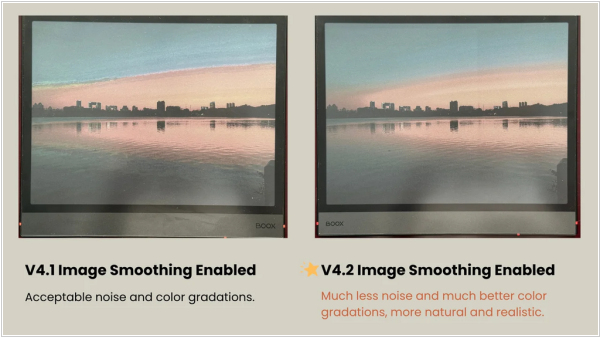
Onyx Boox has released firmware version 4.2 for the Note Air 5C and Go 10.3 Gen 2 Lumi. The main feature is image smoothing, which significantly improves image viewing quality. Other new features include: note page zoom settings, calendar syncing (Google/Outlook), the ability to disable "Anchor" in NeoReader, a floating toolbar in notes, visualized tracing with the pixel eraser and a fix for jitter when drawing straight lines with InkSense styluses (a dedicated toggle has been added to address these issues and smooth out your strokes).
2022. Kobo now allows to adjust font sizes using a pinch gesture

Kobo has started rolling out a new software update 4.33.19759 for their lineup of Kobo ereaders, and the update adds a couple of new features related to adjusting font sizes and reading PDFs. This update adds a new way to adjust font sizes on the fly by using a pinch gesture. Kindles have had this feature for a long time so it’s good to see Kobo adding it as well. However, Kobo’s implementation could still use some refinement. When pinching it pops up a small circular window with a preview of the font size, but it’s kind of hard to tell from a little tiny window, and sometimes the window goes to a blank part of the page and shows nothing, and then it always leaves an ugly afterimage after adjusting. Kobo should add numbers so you know what font size you’re getting instead of just guessing—that’s one thing that’s always bugged me about the font size settings on Kobos.

