Top 10 e-Ink Note-taking e-Readers
Updated: June 16, 2026 | Editor: Dhaval Parekh
Note-taking e-Readers not only allow reading books but also keep useful notes. Taking into account the long battery life of these devices, they are much more suitable for these tasks than regular phone or tablet.
1

The ONYX BOOX Note is a device for reading electronic books with the E Ink Mobius screen with a diagonal of 10,3 with higher definition. This eReader can be the perfect choice for those who often have to read academic or technical literature, for musicians and programmers. Its large and comfortable for eyes display, powerful processor in combination with double sensor control are the optimal tools for reading PDF and DjVu files. Its built-in Wi-Fi module allows one to use the device for full Internet surfing and for connecting to net-libraries.
2

The only tablet that feels like paper. Take handwritten notes, read, and review documents, take notes directly on PDFs. Paper-like writing and reading. All your notes, organized and accessible on all devices
3

Kobo Elipsa provides intuitive note-taking experience and an expansive 10.3” touchscreen. Use the Kobo Stylus to make notes in eBooks and PDFs. Plus, you can create your own notebooks, where you can instantly convert your notes to clean typed text, and export them off your device as needed. When you want to listen to a story, enjoy Kobo Audiobooks with Bluetooth wireless technology. And when you're ready for a break, simply close the SleepCover to protect Kobo Elipsa and put it to sleep. Kobo Elipsa is your book, notebook, and bookstore combined, bundled with everything you need to make your ideas a reality.
4

ONYX BOOX Nova Air is an e-book reader with an increased screen diagonal and high resolution. The stylus that comes with the device allows you not only to take notes in a separate application, but also directly in the text of documents. The body of the reader is made of magnesium alloy, which makes it lightweight and durable. The NOVA Air model is based on the Android which allows you to use various third-party applications and makes the device more multipurpose. Thanks to the increased screen diagonal and double touch control, the e-reader will be an ideal choice for those who read fiction books and work with technical documents.
5
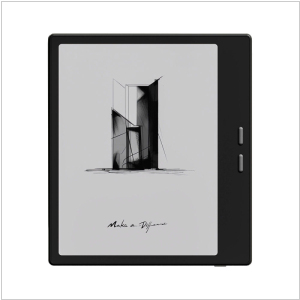
Premium e-note/e-reader with a 7-inch, high-resolution E Ink Carta Plus display with backlighting and dual-touch controls. The device is built on a high-performance hardware platform and runs Android, allowing users to install and use additional apps. It's equipped with modern Wi-Fi and Bluetooth modules, while 64 GB of internal memory and a microSD card slot. Built-in audio player allows you to listen to audiobooks and music through the built-in speaker or headphones. The device features a slim, compact design with control buttons on the side, and its screen is protected by tempered glass. The model supports a stylus for handwritten notes and drawings, which can be purchased separately.
6

Kindle Scribe is the first Kindle for reading and writing, with a 10.2” 300 ppi Paperwhite display, includes Basic Pen. Take notes within millions of titles in the Kindle Store – Handwrite thoughts on sticky notes in your favorite book with the included Basic Pen. Notes are automatically organized by book in one place, so you can browse, review, and export them via email.
7
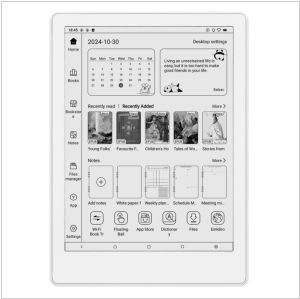
Premium Android ereader with large high-quality 7.8 inch screen. It allows to install popular reading apps such as Kindle, Kobo, Libby, and others. This gives you the freedom to choose your preferred reading ecosystem instead of being locked into just one store. It supports stylus pen and includes enhanced note-taking features, dictionaries, text markup tools, and handwriting support. They are especially useful for students, researchers, and anyone who reads to learn.
8

e-Ink tablet for reading and productivity. Take notes, sketch, annotate printed documents, read ebooks and unleash your creativity with the distraction-free digital notebook. You can take notes directly on PDFs, EPUBs and emails, even edit Word documents by writing proofreading marks.
9

ONYX BOOX MAX is the first ONYX device with 13,3" E Ink screen. The model is based on the Android operating system and can be the perfect choice for those who often have to read academic or technical literature. Its large and comfortable for your eyes display, a powerful processor in combination with 1 GB of RAM are optimal tools for reading PDF and DjVu files. A built-in Wi-Fi module allows one to use the device for full Internet browsing greatly expands its functionality.
10
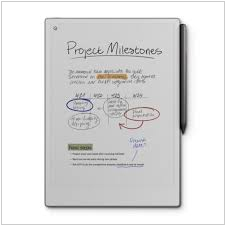
Premium reading and note-taking tablet with a large 11.8-inch color display and adjustable backlight. Unlike other eInk displays, its Canvas Color display uses millions of color ink particles, delivering superior color saturation and depth, a wider range of natural tones, and more refined blending. The textured surface of the specially designed display and lightning-fast response time provide realistic friction and an even more natural writing experience. The e-reader's body is ultra-thin and portable. Add-on accessories are available, including a keyboard case and a stylus. However, the price is very high, starting at $629.
11

ONYX BOOX Tab X is a 13.3" E Reader that is not only ideal for reading, but is also a perfect tool for working with various types of documents. The Android 11 operating system allows you to install and use third-party apps.The body of the E Reader is made of lightweight and durable aluminum-magnesium alloy, the screen is covered with additional protective glass. A high-capacity battery of 6300 mAh provides long autonomous work.
12

Android-based color ereader/note-taking device. Stylus and a variety of tools for ideal note-taking in color. Built-in speaker, Bluetooth, and support for 6 audiobook formats. Text-to-Speech converts text files into natural-sounding audio
13

Smartphone-sized black-and-white e-reader with SIM card and microSD slots. Runs on Android and supports third-party apps.
Latest news about e-Ink Note-taking e-Readers
23.04.26. Kindle Scribe adds new smart shapes
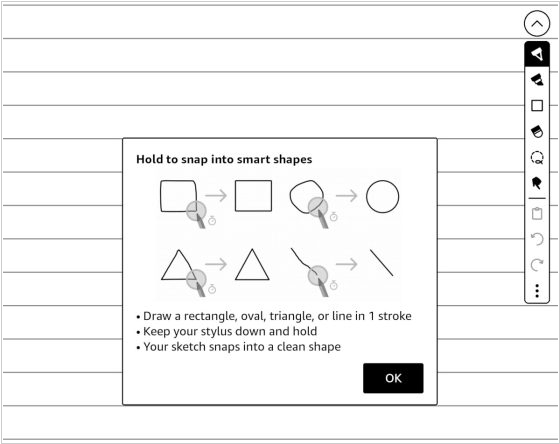
The latest update of Kindle Scribe firmware added a new "smart shapes" feature that lets you draw shapes in notebooks. You can add squares, circles, triangles, straight lines and arrows to notebooks and the program can automatically create perfect shapes from rough hand-drawn sketches if you hold the pen down for a second after drawing them. You can resize and rotate shapes, as well as copy and paste them anywhere. Five different line thickness settings are available and you can make them even thicker using a highlighter or marker. Smart shapes are only available in notebooks; they are not available when adding notes to PDFs or eBooks.
2026. Onyx Boox improved image viewer in its e-notes
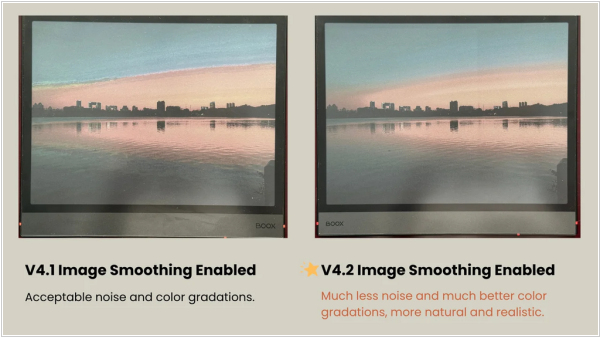
Onyx Boox has released firmware version 4.2 for the Note Air 5C and Go 10.3 Gen 2 Lumi. The main feature is image smoothing, which significantly improves image viewing quality. Other new features include: note page zoom settings, calendar syncing (Google/Outlook), the ability to disable "Anchor" in NeoReader, a floating toolbar in notes, visualized tracing with the pixel eraser and a fix for jitter when drawing straight lines with InkSense styluses (a dedicated toggle has been added to address these issues and smooth out your strokes).