
Top 4 MOBI Readers for iPhone and iPad
Updated: March 23, 2026 | Editor: Maria Lin
MOBI Readers for iPhone and iPad allow to open and read MOBI books on Apple iOS tablets and phones
1


Free e-book reader that supports multiple file formats, including ePub, fb2, mobi, HTML, RTF, HTML, plain text, doc, and more. FBReader uses its own page parsing and rendering engine - very lightweight, fast and customizable. It supports embedded images, footnotes, hyperlinks, text search, full-screen reading. It also automatically creates bookmarks so you don't lose track of where you left off after closing a book. It works on iOS, Android, Windows, Mac OS, Linux, and Chrome OS. Books can be synced across devices or stored in Google Drive. For Android and iOS there are both free and paid versions. Free versions have some limitations.
2


Cute and simple mobile app for reading books on iOS and Android. Provides bookmarks, 3-colors highlights, interactive links and notes, dark mode, customized settings (Fonts, Fields, Text size, screen Brightness, Page scrolling, ets). Suppots text formats: EPUB, MOBI, DOC, DOCX, TXT, FB2, PRC, RTF, ODT, HTML, AZW, AZW3. Completely AD-FREE. Syncs ebooks and reading progress between devices. Free web e-reader is also available. You can upload books via iTunes, import your files from the email, web browser, cloud storages (iCloud, Google Drive, Dropbox, Yandex.Disk etc).
3
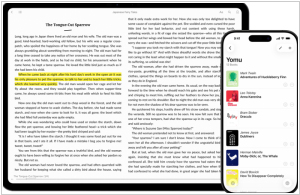
Free eBook reader app for iOS and Mac. Yomu's design is carefully optimized in Apple style: flexible layout dynamically adjusts all text properties and margins based on your preferences and device. You can choose your favorite theme, reading mode (day, sepia, gray, twilight, night, black), select a preset or custom font size, content layout (page, scrolling), and many other options. All settings can be saved separately for each book. You can view the TOC, copy text, take notes, and search within books. EPub, Mobi, PDF, and Kindle formats are supported. You can download books directly from the browser, add them via AirDrop, iCloud Drive, iTunes File Sharing, or from Dropbox, Google Drive, OneDrive, OPDS, and Calibre.
4

Not only an eBooks, Comics reader but also a tons-of-free-ebook-downloader, with dictionary inside for you to studies languages.




