Kobo Forma vs Tolino Epos
May 09, 2026 | Author: Dhaval Parekh
11

Premium 8-inch e-reader with an ergonomic curved design. The durable, waterproof body is incredibly lightweight, so you can comfortably hold it and read for hours. Whether you're right- or left-handed, you can conveniently use the page-turn buttons, read in portrait or landscape mode, or set the text orientation to automatically change depending on how you hold the e-reader. An exclusive Kobo Forma feature is Dropbox support, allowing you to wirelessly upload your own e-books and documents. Storage options include 8GB and 32GB.
9

Tolino Epos 3 is a copy of the 8-inch Kobo Sage for the German market. It's a premium e-reader with some of the best technical features. Turning pages is easy with manual page-turning buttons, and the new E INK Carta 1200 e-ink technology makes the entire process incredibly fast. The main advantage is that you can buy books from over 16 different bookstores and libraries, and collaborate with them all, not just with Kobo. Unlike the Sage, the Epos lacks note-taking features. Although the Epos has Bluetooth, it lacks an audio player, as most Tolino bookstores don't sell audiobooks. Also, the Kobo Power Cover is incompatible with the Epos, so you can't increase the capacity of its measly 1200 mAh battery. Working with PDFs is also terrible due to a poorly configured rendering engine.
Kobo Forma vs Tolino Epos in our news:
2018. Kobo Forma e-Reader gets first major update
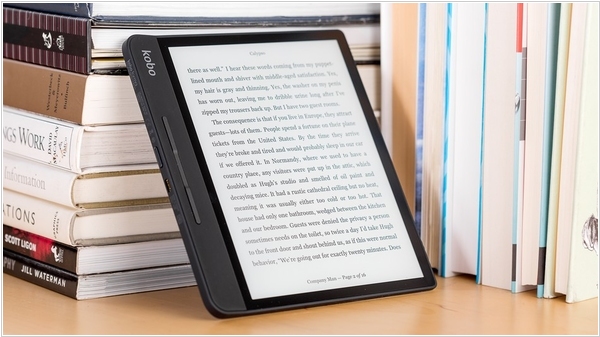
Kobo has just released their first major update for the Kobo Forma e-reader, addressing several ongoing issues such as Wi-Fi reliability and manga performance improvements. Now, while reading, you can use a page-turn button to navigate one page forward or backward and press and hold the button to flip through pages quickly. Kobo has also made the e-reader adaptable for both left-handed and right-handed users. Simply hold your Kobo Forma in either hand and the screen will automatically adjust. You can now read in either landscape or portrait mode—just rotate your device to read in any orientation. To lock the orientation while reading, tap the center of the page to open the menu, then select the rotation icon in the header (you can still hold the device in either hand).