
Kindle Paperwhite vs Tolino Shine
May 09, 2026 | Author: Dhaval Parekh
46

Kindle Paperwhite remains the best choice for most readers thanks to its excellent price-performance ratio. It features a crisp 7-inch display with a 300 ppi resolution and adjustable warm backlighting, on which text appears sharp and perfectly rendered, almost like ink on paper. The fast processor ensures smooth page turns and more fluid navigation, even when reading large PDFs and illustrated novels. The battery life lasts up to 12 weeks. Its thin case with IPX8 water resistance and light weight make it convenient for travel and commuting. Kindle Paperwhite is available in both Wi-Fi and cellular versions.
10

Tolino's small (6-inch) e-book reader which is essentially a rebranded version of Kobo Clara BW with Tolino's software. Kobo is Tolino's technology partner and manufactures the device, while Tolino sells books through it to European bookstore chains (Thalia, Onleihe). Moreover, the Tolino Shine is cheaper in Europe than the Kobo Clara, as the company makes its money primarily from books. Tolino software supports the following formats: EPUB (with DRM), PDF, and TXT.
Kindle Paperwhite vs Tolino Shine in our news:
2020. Kindle ereaders get new font menu system
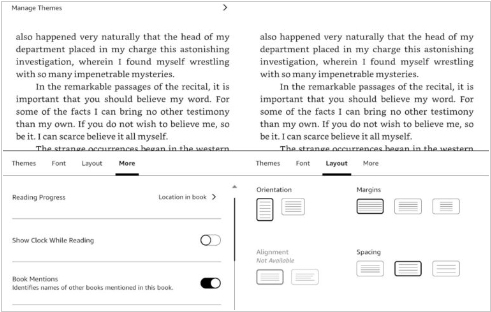
Amazon has released a new firmware update (5.12.4) with a revamped Aa menu for all recent Kindles. It provides users with increased flexibility and control over their reading experience. Essentially, Amazon has reorganized the menu and combined some of the additional settings into one section, eliminating the need to navigate through various menus or sub-menus. When you access the Aa menu on the Kindle now, you'll find several sections: Themes, Font, Layout and more. The first section, called Themes, allows you to create custom themes or choose from several presets like Standard, Compact and Large. The Font menu includes a dropdown for selecting fonts, with slider bars to adjust the font's boldness or size. With fewer font options on the screen, more text is visible in the book you're reading, which helps you see how the font settings look as you adjust them.

