
Kindle Paperwhite vs ONYX BOOX Nova
May 09, 2026 | Author: Dhaval Parekh
46

Kindle Paperwhite remains the best choice for most readers thanks to its excellent price-performance ratio. It features a crisp 7-inch display with a 300 ppi resolution and adjustable warm backlighting, on which text appears sharp and perfectly rendered, almost like ink on paper. The fast processor ensures smooth page turns and more fluid navigation, even when reading large PDFs and illustrated novels. The battery life lasts up to 12 weeks. Its thin case with IPX8 water resistance and light weight make it convenient for travel and commuting. Kindle Paperwhite is available in both Wi-Fi and cellular versions.
14

ONYX BOOX Nova Air is an e-book reader with an increased screen diagonal and high resolution. The stylus that comes with the device allows you not only to take notes in a separate application, but also directly in the text of documents. The body of the reader is made of magnesium alloy, which makes it lightweight and durable. The NOVA Air model is based on the Android which allows you to use various third-party applications and makes the device more multipurpose. Thanks to the increased screen diagonal and double touch control, the e-reader will be an ideal choice for those who read fiction books and work with technical documents.
Kindle Paperwhite vs ONYX BOOX Nova in our news:
2020. You can now delete Kindle Books directly from Kindle
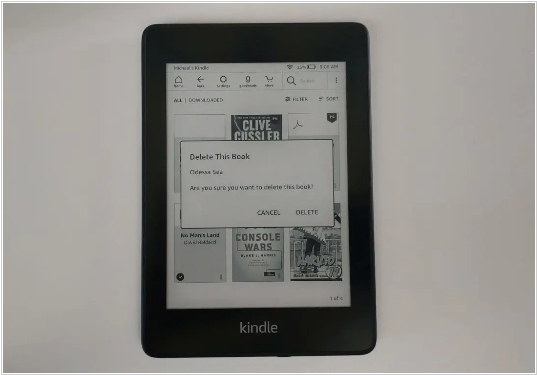
Until now the only way to delete an ebook from your Kindle e-reader was to login to your account via the Amazon website and remove the book. Now, with 5.12.5 firmware update you can totally delete an ebook from your entire Amazon account, right on the Kindle. Just click on My Library and then find the title you want to delete. Hold down on the cover art for two seconds and it will open up a prompt, asking you to confirm the deletion process. Once the removal is complete, it will be totally gone from your Amazon account and you will not see the title appearing in the cloud section any longer. If you accidentally removed the wrong book, you have to buy it again.

