
Goodreads vs LibraryThing
May 19, 2026 | Author: Maria Lin
56

Amazon-owned world's largest website for book recommendations and discussions. You mark which books or genres you've enjoyed in the past, and the site makes helpful recommendations. Its recommendation system is said to analyzes 20 billion data points to provide suggestions tailored to your literary tastes. You can also read reviews from other people, connect with readers with similar interests and see what books your friends are discussing. You can create "bookshelves" to organize what you've read (or want to read). You can also comment on each other's reviews.
53

LibraryThing is free cataloging and social networking site for book lovers. LibraryThing allows to create online catalog of books and access it from anywhere - even on your mobile phone. You can upload own book collections and parse metadata from Amazon, track your reading progress, rate and review books. Because everyone catalogs together, LibraryThing also connects people with the same books, comes up with suggestions for what to read next. You can check out other peoples' libraries, see whose library is most similar to yours, swap reading suggestions, and more. You can also turn your library into a real online catalog for visitors. Available in over 50 languages.

See also:
Top 10 eBook Organizers
Top 10 eBook Organizers
Goodreads vs LibraryThing in our news:
2025. Talpa Search integrated with Aspen Discovery

LibraryThing's book-search service Talpa Search is now available in Aspen Discovery - open source discovery system that gives patrons seamless access to all library resources in one place. Aspen Discovery libraries can now enable Talpa Search as a search mode, allowing patrons to search for books using natural language, see results from Talpa Search seamlessly integrated into the look and feel of their library catalog. For example Talpa Search can find items by the description of plot details, genre, descriptions and more. It enables users to search for “novels about France during World War II” or “recent cozy mysteries” and receive relevant results, all within their existing library catalog, without special syntax or filtering.
2015. LibraryThing released iOS mobile app
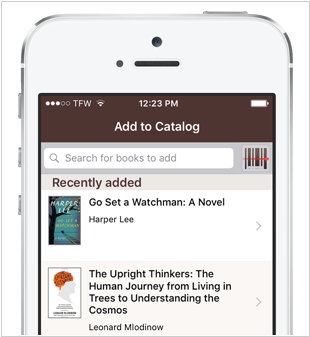
Online service for book collection management LibraryThing has launched an official iPhone app. This initial version is limited to performing the basic tasks necessary for cataloging. You can browse and search your library, add books by scanning barcodes, search for books, browse and upload covers using the iPhone camera and make minor edits such as changing collections and ratings. LibraryThing is offering free lifetime memberships to anyone who uses the app within the next month. You need to create a new account using the LibraryThing app.
2015. LibraryThing unveiles an online tool for small libraries
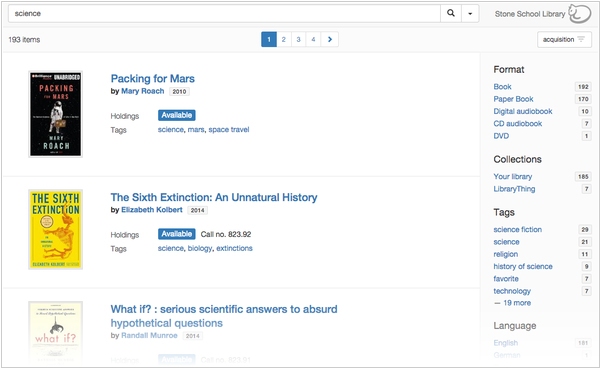
LibraryThing, the online personal library organizer, has introduced TinyCat—a robust, user-friendly online catalog for smaller libraries (fewer than 20,000 titles). These smaller libraries—such as churches, synagogues, small schools, community centers and academic departments—have been utilizing LibraryThing to organize their collections for nearly a decade. This tradition continues with TinyCat. TinyCat provides a refreshed way to view the catalog, offering a cleaner interface focused on helping patrons find and explore books in your library. LibraryThing developers recently added numerous new features, many of which were crucial for making TinyCat possible (including Barcode Support, Circulation, Advanced Search and now the new MARC Import feature). TinyCat incorporates the best and most useful enhancements LibraryThing can provide—more than nearly any “big-library” catalog offers.

