Calibre vs ePubSoft Converter
November 26, 2025 | Author: Maria Lin
62

Calibre is a free, open-source program (written in Python) for managing e-book libraries on Windows, Mac and Linux. It offers the most rich set of features, divided into the following main categories: library management, e-book conversion, synchronization with e-readers, downloading news from the internet and converting them to e-book formats, e-book viewer-reader, e-book editor and a content server for web access to your book collection. The program reorganizes book files into own structure. There are numerous plugins developed for the program by the community. However, many find the interface cluttered and unwieldy.
24

eBook Converter Bundle that provides tools to convert ebook to other formats, it support DRM ebook or DRM-free ebook, include Kindle DRM, ADEPT Adobe Digital editions DRM, Barnes Noble NOOK ebooks, output format support PDF/Kindle/ePub/Word/Text.
Calibre vs ePubSoft Converter in our news:
2011. Book management program Calibre integrates with book websites
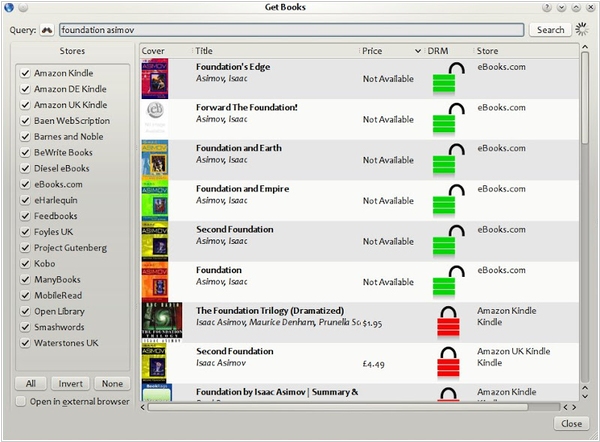
The latest version of book manager Calibre 0.8 can now search across numerous web stores like Amazon, Barnes & Noble, Waterstones and others for e-book editions of the book you want. The results are shown sorted by price, making it easy to find the most affordable edition to add to your collection. This feature, like the rest of Calibre, is plugin-based, so expect new stores to be added in the future. When downloading covers for a single book, Calibre will now retrieve covers from all available online sources and let you choose the one you prefer, rather than making the choice for you. Additionally, you can now perform search and replace operations on the book list in your Calibre library using the Bulk Metadata Edit tool and create complex file names from book metadata when exporting books from the Calibre library. The new Virtual Columns feature allows you to add custom metadata fields and automatically populate them from Calibre. For instance, you can add an ISBN column or a column to display the formats the book is available in.