Alfa Ebooks Manager vs Booknizer
December 21, 2025 | Author: Maria Lin
63

Powerful, yet beautiful and easy-to-use book organizer. Suitable for book lovers, collectors, students, teachers, schools and business libraries. Allows to organize e-books and printed books in a single digital library. Includes a built-in reader, audiobook player, format converter, metadata editor and a web server for local network access. Enables to quickly find books, including by full-text search. It's highly customizable - you can add custom fields, build a genre tree, add tags. Integrates with Amazon, Google Books and other websites to update book metadata. You can even view books in 3D.
35

Booknizer is a book organizer that works with paper, e-books (EPUB, MOBI, PRC, PDF, FB2) and audiobooks (MP3, M4b, WMA, etc.). It lets you copy books to a reading device (Kindle, Barnes & Noble Nook, Sony Reader, etc.), scan folders on your computer, search and filter book list and convert some e-book formats. For paper books, the program shows the exact location of any book on a bookshelf. The book organizer displays the book cover, synopsis, genres, publication year, as well as your own rating and comments. The program also allows you to view the author's bibliography, bio, and photos.

See also:
Top 10 eBook Organizers
Top 10 eBook Organizers
Alfa Ebooks Manager vs Booknizer in our news:
2021. Book management software Booknizer 10 gets a new engine, quick filters for authors, group operations
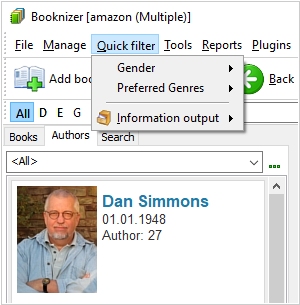
The new major update of the book management software Booknizer 10 brings a number of significant improvements thanks to the new internal engine. Most of the program's old code was completely rewritten to get rid of bugs and include modern optimizations. In previous versions of Booknizer, the quick filter menu always referred to books. New Booknizer can apply quick filters to authors, too. When the "Authors" tab is active, the menu switches to the authors view automatically. In the new version you can move the mouse cursor over the list of covers / photos and select an item by clicking on a checkbox that appears. This enables Group Operations, allowing to change / update multiple items at once. This is different from previous version, where you needed to enable Group Operations separately. Besides, it added support for picture download via HTTPS, quick search of highlighted phrase on Google, warnings in Add Book tool that a certain book is already in the library, autocomplete feature in drop-down fields. The new publication year field can hold the year of a particular edition and the total cost of your collection is now shown in the statistics window (according to the price entered or downloaded).