Scrivener vs yWriter
May 06, 2026 | Author: Laura Candler
64

Win/Mac software for writers of all genres and screenwriters. Everything you write is integrated into a convenient project plan that's easy to edit. The program makes working on long texts easier because it breaks them down into smaller sections. Writers can write each scene in a separate document or entire chapters as a single unit; theses can be divided into arguments, chapters or paragraphs. The Corkboard interface allows you to overview character stories, chapters or the entire book. It also allows to organize reference materials into collections, flexibly customize formatting and styles, create templates for frequently repeated sections, edit metadata, export the book to popular formats such as Word, PDF and Final Draft, create automatic backups. Authors also can use iOS app that allows to write while traveling and then sync with desktop via Dropbox or iTunes.
9

Free novel-writing software designed by veteran author and programmer, Simon Haynes. yWriter helps you to write a book by organising chapters, scenes, characters and locations in an easy-to-use interface.
Scrivener vs yWriter in our news:
2021. yWriter - free software for novel writers
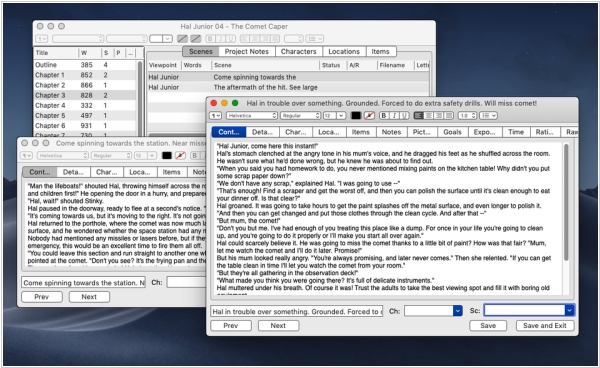
yWriter is a useful program designed specifically for novelists. It provides a suitable and easy-to-use interface for organizing information and writing novel by chapters and scenes. It includes such features as a word count, character and location cards, scene summaries that make it easy to track your story progress. The program also allows to set goals for each session, helping you stay focused and motivated. One of yWriter's advantages is its compatibility with Dropbox that allows to save and sync their database. This means writers can easily work on their novel from different devices without worrying about losing progress. A new Android app adds an extra layer of convenience. yWriter is free to download and use, but we encourage you to register your copy if you find it useful.