
Scrivener vs Vellum
May 06, 2026
64

Win/Mac software for writers of all genres and screenwriters. Everything you write is integrated into a convenient project plan that's easy to edit. The program makes working on long texts easier because it breaks them down into smaller sections. Writers can write each scene in a separate document or entire chapters as a single unit; theses can be divided into arguments, chapters or paragraphs. The Corkboard interface allows you to overview character stories, chapters or the entire book. It also allows to organize reference materials into collections, flexibly customize formatting and styles, create templates for frequently repeated sections, edit metadata, export the book to popular formats such as Word, PDF and Final Draft, create automatic backups. Authors also can use iOS app that allows to write while traveling and then sync with desktop via Dropbox or iTunes.
15

Vellum is a software for creating Apple-, Kobo- and Amazon-approved ebooks and POD books with one click. It creates not only professional but beautiful text-centric ebooks. The creators took care of everything: simple to use, easily imports from Word, and easy to change things even after the epub export. Only Available for Mac
Scrivener vs Vellum in our news:
2022. Vellum 3.4 enables export books to Word
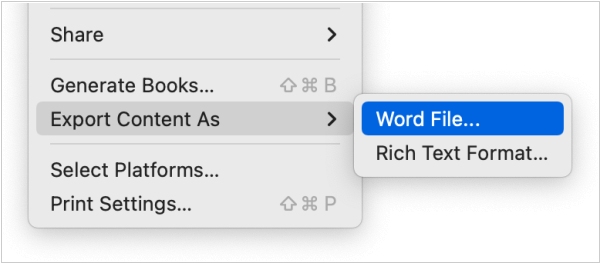
Vellum 3.4, a new version of the e-book formatting program, is adding some inetersting new features. In addition to importing Word files into Vellum, you can now also export your written text to a Word file using the "Export Contents" command in the "File" menu. The new "Notes" feature allows you to personalize your book by adding a letter or note as if written by characters. You can customize the letter settings by adding various design elements and choose from a variety of handwritten fonts. Additionally, the new "Text Messaging" feature allows you to create instant messaging conversations between characters in your book. You can customize sent and received messages and choose from six different styles to make your book more interactive.

