Papers vs Zotero
February 23, 2026 | Author: Laura Candler
7

Reference manager that helps to collect and organize research materials. Imports information from your computer, databases, journals, other reference managers, Dimensions database (which provides AI-powered recommendations), automatically identifies and matches imported articles with full metadata and available supplementary data, citations and full texts. You can use tags, custom fields, labels, lists, ratings, smart collections and watch folders to keep everything organized and accessible as your library grows. In the articles you can highlight, underline, strikethrough, create inline annotations, draw and add stickers.
15

Free, open-source software for managing bibliographic data and research-related materials. Zotero helps to collect, organize, annotate, cite and share research results. The built-in assistant automatically identifies research as you browse the web and creates citations and bibliographies for any text editor, as well as directly in Word, LibreOffice, and Google Docs. You can sort items into collections and tag them with keywords. You can also create saved searches that automatically populate with relevant materials as you work. The program runs on Mac, Windows, Linux, Android, and iOS.
Papers vs Zotero in our news:
2018. Zotero improves PDF retrieval with Unpaywall integration
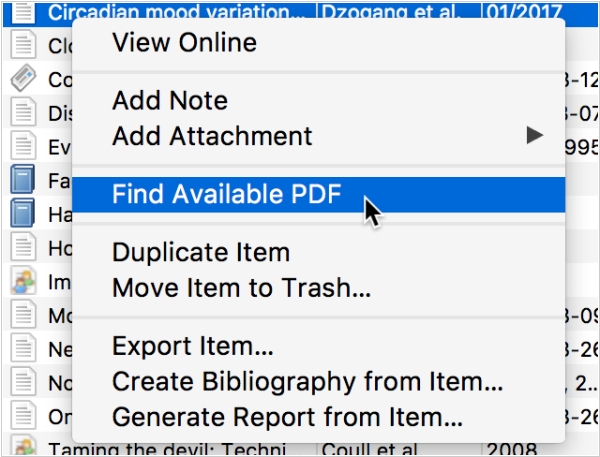
Open-source Reference Management software Zotero has introduced an enhanced feature that streamlines the process of accessing PDFs for items in your Zotero library. While Zotero has always been able to download PDFs as you save items from the web, many of these PDFs are often behind publisher paywalls, making them inaccessible to many users. To address this, Zotero has integrated with Unpaywall, a database of legal, full-text articles available from publishers and repositories worldwide. If Zotero cannot find or access a PDF from a webpage where an item is saved, it will automatically search for an open-access PDF using data from Unpaywall. The same process is followed when using “Add Item by Identifier” to create a new item and a new “Find Available PDF” option in the item context menu is available to retrieve PDFs for existing items in your library. Moreover, Zotero can now take better advantage of PDFs available through institutional subscriptions. When using “Add Item by Identifier” or “Find Available PDF”, Zotero will first attempt to find a PDF to download associated with the item’s DOI or URL before looking for open access copies.