
Paperpile vs Papers
February 23, 2026 | Author: Laura Candler
8

Simple and convenient web app for managing bibliographic references, integrated with Google Apps (allows you to log in with your Google account, sync PDFs with Google Drive, cite articles in Google Docs, collect references using a Chrome extension). Paperpile lets you organize your articles with folders, tags, and stars, search the library in real time or quickly find articles online. It automatically corrects incomplete references and removes duplicates. You can import data directly from Google Scholar, PubMed, ArXiv and thousands of supported publisher websites. Apps for iOS and Android are available, as well as a Word plugin.
7

Reference manager that helps to collect and organize research materials. Imports information from your computer, databases, journals, other reference managers, Dimensions database (which provides AI-powered recommendations), automatically identifies and matches imported articles with full metadata and available supplementary data, citations and full texts. You can use tags, custom fields, labels, lists, ratings, smart collections and watch folders to keep everything organized and accessible as your library grows. In the articles you can highlight, underline, strikethrough, create inline annotations, draw and add stickers.
Paperpile vs Papers in our news:
2022. Paperpile created free citation app for students
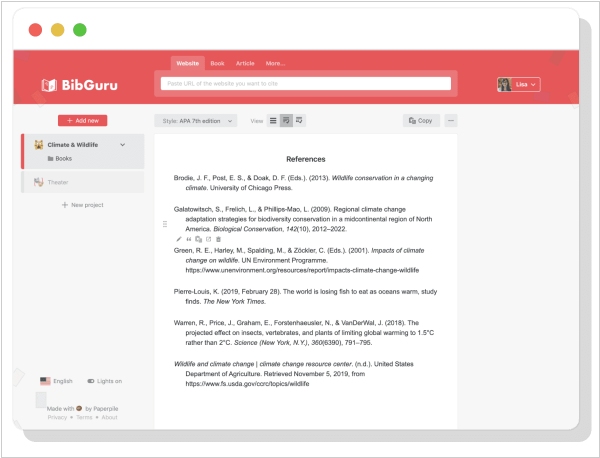
Paperpile has created a new app called BibGuru, a simple and streamlined citation generator specifically designed for students. While collaborating with students, the company recognized that conventional reference managers such as Paperpile can be excessive for basic student essays. To address this issue, they created a new app. The aim of BibGuru was to develop a citation tool that is user-friendly and requires minimal training to operate. BibGuru is completely free and features a search bar that allows students to search for books, websites and journal articles and add them directly to a bibliography. MLA, APA and thousands of other citation styles can be used to generate citations and references. Students can create individual assignments and folders can be used to arrange sources according to assignment requirements, source type, or other criteria. Citations and bibliographies can be exported as a Word document, copied and pasted into Google Docs, or exported as bibliographic data files (BibTeX or RIS) for use with other reference management apps.

