
Kindle vs Libby
January 03, 2026 | Author: Maria Lin
64

Amazon Kindle enable users to shop for, download, browse, and read e-books, newspapers, magazines. It provides over 1 million books in the Kindle Store. Amazon Whispersync automatically syncs your last page read, bookmarks, notes, and highlights across devices (including Kindle), so you can pick up your book where you left off on another device. Provides apps for Android, iOS, Blackberry, Windows Phone, Mac, PC and the family of ereading devices
15

Libby is a free app and web service (from OverDrive) for renting digital books from local libraries. Over 90% of public libraries in North America have OverDrive, and Libby can be found in 78 countries worldwide. You sign in using the library card you get from your local library. Books aren't freely available - you have to join a queue and wait for other users to make a book available before you can borrow it (as the library has a license for a limited number of copies). Libby has no paid subscriptions or in-app purchases. The app includes a book reader and audiobook player, and syncs your reading progress across devices.
Kindle vs Libby in our news:
2025. PocketBook eReaders get Libby integration

OverDrive and Pocketbook have released Libby app for PocketBook e-readers. This app allows users to borrow e-books and audiobooks from public libraries. For now you can download ebooks to read them offline, but the press release states that a web browser is required to listen to audiobooks (recall, that Kobo also does not support downloading audiobooks from libraries using Libby). The app also allows users to manage their accounts and use multiple library cards simultaneously. Currently, the app is only available for PocketBook Era Color, but it is promised to become available for the entire PocketBook e-reader and e-notes lineup soon.
2024. Kindle e-readers cannot access Overdrive Books anymore
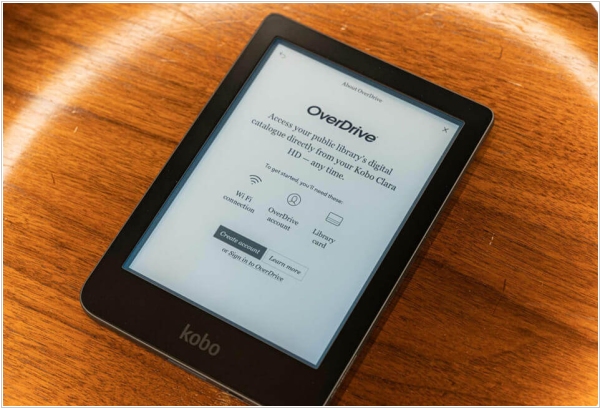
Amazon's Kindle content management system is experiencing serious technical issues. For example, users are unable to open new books purchased from Kindle bookstore and books already in their library but not downloaded locally are inaccessible. Kindle's upload system has been experiencing issues for three weeks, with no solution in sight. Furthermore, the inability to upload Overdrive and Overdrive Libby e-books to Kindle e-readers has persisted for several months, further exacerbating user issues. The Overdrive Libby issue is related to the use of a dedicated app for Android and iOS. It also affects the main Overdrive website, where users can log in to their local library branches. It's important to note that uploading e-books from a library to a Kindle via the Overdrive website or the Libby app is only available to users in the United States.
2020. Kindle makes it easier to borrow ebooks from Prime Reading
Kindle-readers now allow to borrow ebooks from Kindle Unlimited, Prime Reading and the public library, right on your home screen. This is all apart of the 5.13.3 firmware update that was just released today, it is compatible with most devices dating back to the Kindle Voyage. These recommendations to view popular titles from Kindle Unlimited and Prime Reading need to have Home Screen View turned on, for it to work properly. You can enable/disable these in the settings menu. Amazon has also moved the Kindle user guide from your library shelf to the help menu. This will help free up some space. There has also been a number of performance improvements, bug fixes, and other general enhancements.
2015. Kindle Convert allows to turn your paper library into e-Books
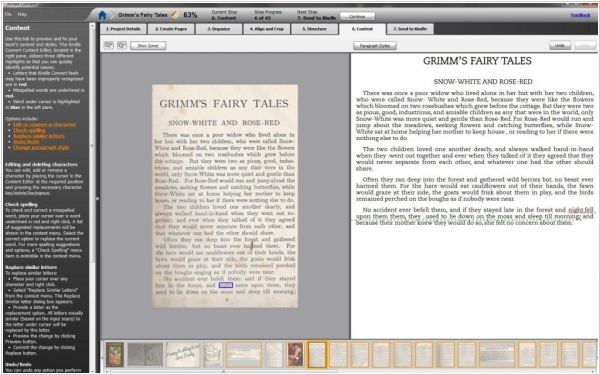
If you’ve been holding on to those paper books because the notion of having to repurchase them all as Kindle titles is intimidating, Amazon has a new service for you: Kindle Convert, a program for Windows that transforms print books into digital versions fully compatible with Amazon’s Kindle software, including adjustable font, Whispersync for ensuring you’ll be able to return to the farthest read position on any device and backup in Amazon’s cloud for free, providing access across devices. The software costs $49. To get your books into digital format, you’ll have to actually scan them using a standard flatbed or other type of computer scanner, which means doing things two pages at a time at most. It’s also restricted to U.S. customers for now.

