EndNote vs Zotero
February 18, 2026 | Author: Laura Candler
12

Intelligent reference manager that lets you store and manage an unlimited set of references, perform full-text searches, insert properly formatted references and create bibliographies as you write your research. The program uses a system of tags and rules to automatically organize references throughout a project, and AI to identify key findings. You can ask the AI additional questions and receive answers from the text to delve deeper into the topic. It also can translate whole PDFs. EndNote also includes collaborative tools that allow to share entire libraries or subsets of references, set access rights, view activity logs to stay informed about progress.
15

Free, open-source software for managing bibliographic data and research-related materials. Zotero helps to collect, organize, annotate, cite and share research results. The built-in assistant automatically identifies research as you browse the web and creates citations and bibliographies for any text editor, as well as directly in Word, LibreOffice, and Google Docs. You can sort items into collections and tag them with keywords. You can also create saved searches that automatically populate with relevant materials as you work. The program runs on Mac, Windows, Linux, Android, and iOS.
EndNote vs Zotero in our news:
2019. Zotero allows to move citations between Google Docs, Word, and LibreOffice
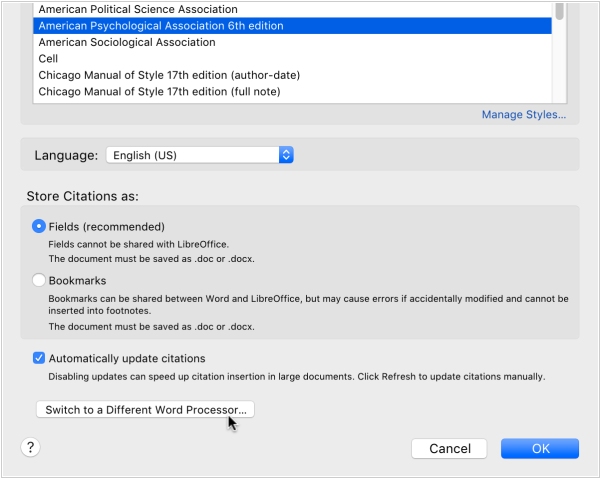
Zotero, the scientific paper management program, has introduced a new feature that allows users to transfer documents between Google Docs, Word and LibreOffice with maintaining active Zotero links. This means user can begin creating a document in Google Docs and then transfer it to Word or LibreOffice for final editing and vice versa. To use this feature, Zotero converts references and bibliography into a temporary format that ensures secure transfer between word processors. To get started, select "Switch to another word processor..." in the Zotero plugin's document settings window, save the converted file, open it in the other word processor and click Update to continue working. Google Docs users can also select "Switch to another word processor..." from the Zotero menu.
2015. Zotero has streamlined saving, easier bibliography language selection
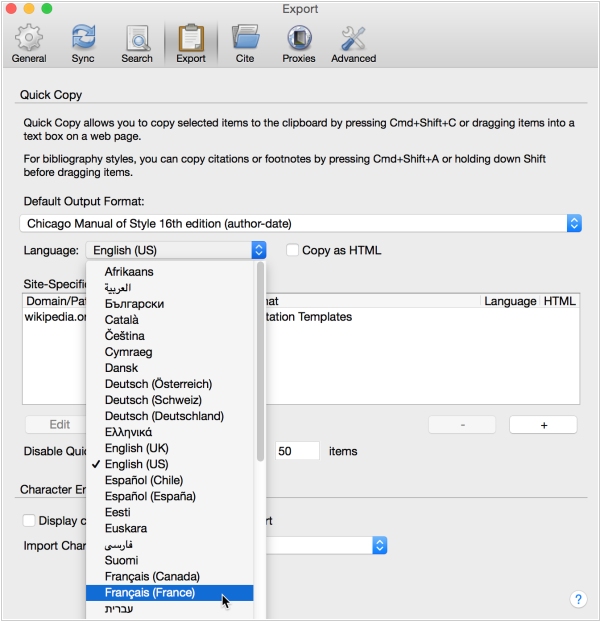
Reference Management software for Mac and PC Zotero has released a new version, bringing with it a number of new features and improvements. One major new feature is the improved ability to save items from webpages, thanks to Zotero's site translators which work with most library catalogs, popular websites such as Amazon and the New York Times and many gated databases. Additionally, Zotero now offers the ability to generate citations in dozens of different languages and users can now set the bibliography language at the same time they choose a citation style, whether they're using Quick Copy, Create Bibliography from Selected Items, or the word processor plugins. Furthermore, Zotero now offers an “Export Library…” option for group libraries, which makes it easy to export the full collection hierarchy. Lastly, if you encounter many sync conflicts, you can now choose to resolve all conflicts with changes from one side or the other.