
EndNote vs Mendeley
February 18, 2026
12

Intelligent reference manager that lets you store and manage an unlimited set of references, perform full-text searches, insert properly formatted references and create bibliographies as you write your research. The program uses a system of tags and rules to automatically organize references throughout a project, and AI to identify key findings. You can ask the AI additional questions and receive answers from the text to delve deeper into the topic. It also can translate whole PDFs. EndNote also includes collaborative tools that allow to share entire libraries or subsets of references, set access rights, view activity logs to stay informed about progress.
17

Free, universal reference manager for managing and sharing research papers, as well as creating bibliographies for research articles. Mendeley allows to search over 100 million articles from multiple publishers, quickly add PDFs to your library, organize them with collections and tags, then read and annotate them. You can work with a single database across the desktop app, web version and Word plugin. It provides 2 GB of free storage. The program features an AI assistant that thoroughly understands your library and quickly finds what you need, identifying patterns, relationships, and missing links in your references. Mendeley's AI interprets the logic behind your queries, extracting context-rich information from your documents.
EndNote vs Mendeley in our news:
2023. Mendeley Cite adds footnote citation styles
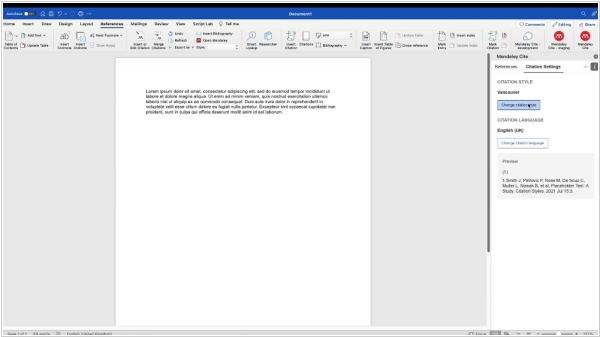
Mendeley Cite has implemented new footnote citation styles for inserting into Word documents. The new styles add references to the bottom of the document page as a footnote (previously, the plugin could insert only references inline). They include: Chicago Manual of Style, 17th edition (full footnote), Modern Language Association, 6th edition (footnote), OSCOLA (Oxford University Standard for Legal Citations) and more. To use them, first open the app and select "Citation Settings," then "Change Citation Style." Second, find and select the desired citation style and either select the references you want to insert or insert the selected references by clicking "Insert # of references" in the pop-up window at the bottom of the add-in. In the desktop Word, the footnote reference will immediately appear at the bottom of the document page, but in Word for the web, it will appear after you select the footnote number.
2020. Mendeley has introduced new Web Importer
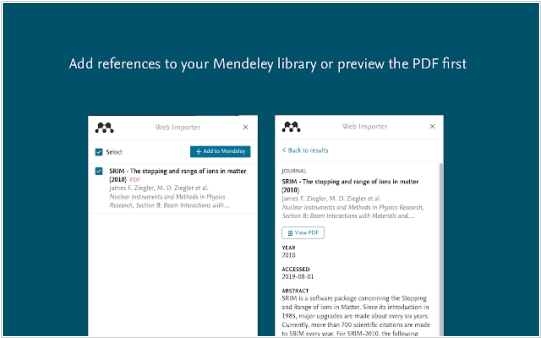
Mendeley has introduced a new version of Mendeley Web Importer, a tool that simplifies adding articles from the web to your reference library. The new Mendeley Web Importer is available for both Google Chrome and Firefox. Its engine has been completely redesigned to ensure the highest search reliability. It can continue downloading PDFs even if you close the window or switch tabs. If you prefer to scan the full text before adding it to your Mendeley library, you can now simply select "View PDF". The PDF will open in Elsevier's enhanced PDF reader, complete with navigation keys and interactive elements for viewing full text. The updated interface makes adding references directly to collections and groups in your library more intuitive and easier. It now also remembers your last selected collection, saving you time.

