
Dabble vs Scrivener
May 06, 2026 | Author: Laura Candler
16

Book writing software. Write anywhere, anytime, online and offline. Always autosaved. Easily organized. Focus mode and goal tracking
64

Win/Mac software for writers of all genres and screenwriters. Everything you write is integrated into a convenient project plan that's easy to edit. The program makes working on long texts easier because it breaks them down into smaller sections. Writers can write each scene in a separate document or entire chapters as a single unit; theses can be divided into arguments, chapters or paragraphs. The Corkboard interface allows you to overview character stories, chapters or the entire book. It also allows to organize reference materials into collections, flexibly customize formatting and styles, create templates for frequently repeated sections, edit metadata, export the book to popular formats such as Word, PDF and Final Draft, create automatic backups. Authors also can use iOS app that allows to write while traveling and then sync with desktop via Dropbox or iTunes.
Dabble vs Scrivener in our news:
2024. Book writing software Dabble makes it easier to create characters

Dabble has released a new version with enhanced character and cast creation feature. Now authors can craft intricate backstories, define relationships and visualize cast with our new Cast and Characters features. You can now set up property lists in Notes and Characters to keep track of all the important details, mark your editing progress, scenes to come back to, or important notes by changing their icons, create and reuse your own character templates easily. Just like Character Templates, you can create a template for your scenes and scene notes. Perfect for following along with writing courses or setting up your scenes in the perfect way. Notes can have banners now. Whether it's a magical ring or a flaming volcano, you can visualize what your note is more easily. And just like Characters and Scenes, you can create various note templates. Besides, now you can print notes directly from Dabble quickly and easily. No more messing about with exporting first.
2020. Dabble refreshed its design on desktop
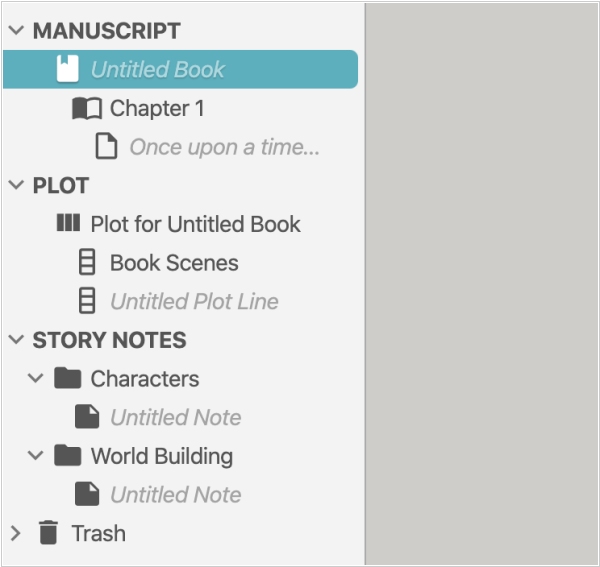
Ebook Editing software Dabble has released some new desktop features. Dabble's developers have made several updates to improve the user experience. The icons have been improved for a crisper look, the font has been changed to match the user's operating system and section headings in the left-hand navigation have been adjusted for easier scanning. Preferences, profile and billing have been redesigned for easier use, particularly on touch devices. The new status bar at the bottom of the screen displays the word count and project save and sync status, while two quick buttons in the bottom-right corner allow users to toggle and disable focus mode and enter and exit full screen mode. To customize the manuscript and story notes, users can adjust fonts and formatting on a per-project basis. Additionally, the project doc at the top of the navigation allows users to name the project something different from the book's title, which is useful for identifying series or multiple versions of the same book.

