
Alfa Ebooks Manager vs Libib
December 20, 2025 | Author: Maria Lin
63

Powerful, yet beautiful and easy-to-use book organizer. Suitable for book lovers, collectors, students, teachers, schools and business libraries. Allows to organize e-books and printed books in a single digital library. Includes a built-in reader, audiobook player, format converter, metadata editor and a web server for local network access. Enables to quickly find books, including by full-text search. It's highly customizable - you can add custom fields, build a genre tree, add tags. Integrates with Amazon, Google Books and other websites to update book metadata. You can even view books in 3D.
44

Cloud cataloging service that allows you to store books, board games, movies, music and video games in a single library (doesn't let to upload and store files). It's suitable for libraries, schools, organizations, and home personal catalogs. It allows you to create mixed collections, add notes, and share your collections. It offers mobile apps with automatic synchronization and an ISBN/UPC barcode scanner. Libraries can use features such as book lending, reader management, custom fields, barcode management, an online library website, report generation, SSO integration (Google, Classlink, Clever, Microsoft), and invoicing.

See also:
Top 10 eBook Organizers
Top 10 eBook Organizers
Alfa Ebooks Manager vs Libib in our news:
2023. Libib adds Patron freeze to prevent self-checkouts/holds
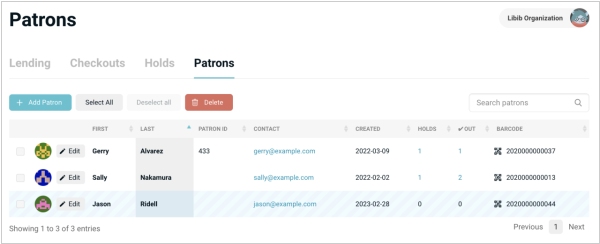
Сloud-based library management service Libib has introduced a new feature called "Visitor Freeze". Previously, Libib Pro accounts allowed users to self-checkout e-books through a online platform or kiosk. However, there was no restriction to prevent users from exceeding their limits on placing self-checkouts. The only way to resolve this was to completely delete the user, that would also delete their visiting history and current checkouts/holds. So Libib now offers library managers the ability to freeze a user's account. If a library administrator chooses to freeze a user, that user will no longer be able to self-checkout books or place book holds. Instead, when attempting to checkout an item, they will receive a notification that their account is currently frozen.
2022. Online home library software Libib allows to edit individual fields fast
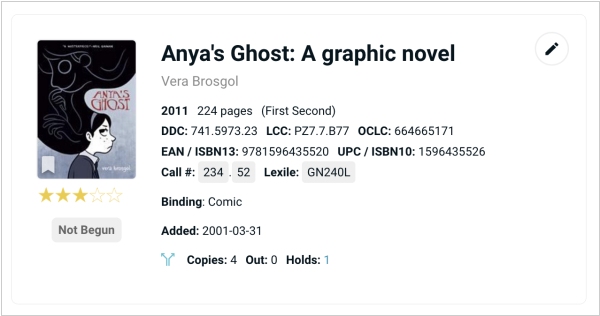
Libib has introduced a new additional way to edit individual fields on an item. Each item now displays a pencil icon which will bring up a quick edit menu. This menu is completely accessible through the keyboard; no need to use the mouse to click on anything once it’s up. Begin searching for the field name that you want to edit and the list of options automatically reduce down to your choice. Using quick edit feature to change the title of an itemALT. Click enter on the keyboard to select the first option, or press the down-arrow key to select what you want. Your cursor is automatically placed in the input box and you can start typing. Hit enter to save, or tab to the save button and hit enter. Once it is saved, you are brought right back to the searchable fields, where you can immediately begin editing another field. When you’re done, simply hit escape on your keyboard to close out.

